Built for one site. Scales to national operations.
GuardSync AI connects every layer of your security and safety operation — from the person on the ground to the executive dashboard — in one intelligent platform. No hardware. No six-month rollout. Live in 48 hours.
Cable detached from cable machine during use.
Photo shows a cable machine with the cable hanging loose from its routing near the frame, consistent with the report.
Photo is consistent with the reporter's claim.
Cable detached during use; minor equipment damage.
Further detachment or minor injury is possible.
Unrepaired failure could cause serious injury.
Requires senior management attention. Develop a treatment plan with owners and deadlines.
< 30s
to submit any incident
Real-time
sync across all sites
100%
timestamped, audit-ready
48 hrs
to go live, no hardware
Four pillars. One connected platform.
Every capability is built to feed the others. Reports generate analytics. Analytics drive alerts. Alerts close the compliance loop.
See when and where incidents happen
Trend lines show how incident volume moves week to week. The heatmap pins down the exact day and hour things go wrong, so rosters and patrols go where they're needed.
- Incident frequency & trend lines
- Day-of-week × hour-of-day heatmaps
- Hotspots across every location
- Resolution-time benchmarks


Peak: Thu 5AM
Spotted automatically
Every site, every state, one view
From one gym to a national network: see where incidents cluster, how each state compares on severity, and which sites need attention first.
- Live national / state map view
- Per-state severity breakdown
- Every site ranked, one click to drill in
- Multi-region teams & alert routing

State comparison
391 incidents
Site ranking
- 1Site 14VIC22
- 2Site 03NSW12
- 3Site 27VIC11
- 4Site 09VIC11
- 5Site 31VIC11
Proof every patrol happened
Guards scan each checkpoint and photograph what they checked. AI verifies every photo against the checkpoint's instructions, scores the scan, and flags anything missed — so you can show clients exactly what was done.
- Checkpoint scans with photos
- AI checks every photo against its instructions
- Missed & late patrols flagged per shift
- Client-ready shift reports
Fire exit B · 12:06
VERIFIEDScan score
85
Performance
85
Penalty
0
Photos match the checkpoint: strong match. 1 must-have (−15) failed.
Instruction compliance
- PASS
Fire exit door closed and latched
- PASS
Exit path clear of obstructions
- FAIL
Exit sign illuminated
No submitted photo shows the exit sign.
A record that stands up when it's needed
Every status change, alert and note is logged with who and when. Patrol shifts become one-page reports for clients, and daily checklists are saved the moment each box is ticked.
- Full audit trail on every incident
- Client-ready patrol reports, one-click PDF
- Daily checklists, saved as they're ticked
- SMS, email & app alert routing
Patrol shift report
Collins St Site
Thu 15 Oct, 11:30–13:00 · Guard: J.M.
Overall
86
J.M. completed 4 of 5 required checks, missing Plant room. 4 scans with 11 photos were submitted, all on time. 3 of 4 met every must-have instruction. 1 medium finding.
Completion
80
60% weight
Performance
95
40% weight
Penalty
0
fraud signals
Checks by checkpoint
- Loading dock
- Car park L2
- Fire exit B
- Roof access
- Plant room
MEDIUM · SAFETY · LOADING DOCK · 11:41
Pallet partly blocking the walkway beside the roller door.
Incident timeline · #70E5BF73
Action assigned
- Incident reported08:36
Reported via QR code
- Alert sent08:36
Email & SMS to site manager
- Status08:52
Under review
Sam K. · Site manager
- Status09:10
Action assigned: machine tagged out
Sam K. · Site manager
- Note09:14
Technician booked for 2pm
Priya R. · Operations

One scan. Everything else is automatic.
GuardSync handles the entire lifecycle of an incident — from first report to final audit trail — without a single manual step.
QR code scanned
Anyone — staff, visitor, contractor
Submitted in < 30s
Photo, location, timestamp — captured
AI analyses instantly
Scored, summarised, categorised
Right person alerted
SMS, email, or in-app — your rules
Dashboard updated
Live across every site you run
Audit trail locked
Immutable record, export-ready
We didn't add AI. We built around it.
Every report that comes through GuardSync is analysed before anyone opens the dashboard. No configuration required.
AI Photo Analysis
Every photo cross-checked against the report text automatically.
AI Credibility Scoring
Every report scored for confidence so you know what needs action first.
AI Incident Summaries
Instant plain-language summaries — no reading the full report required.
AI Pattern Detection
Hotspots and recurring issues surface automatically across all sites.
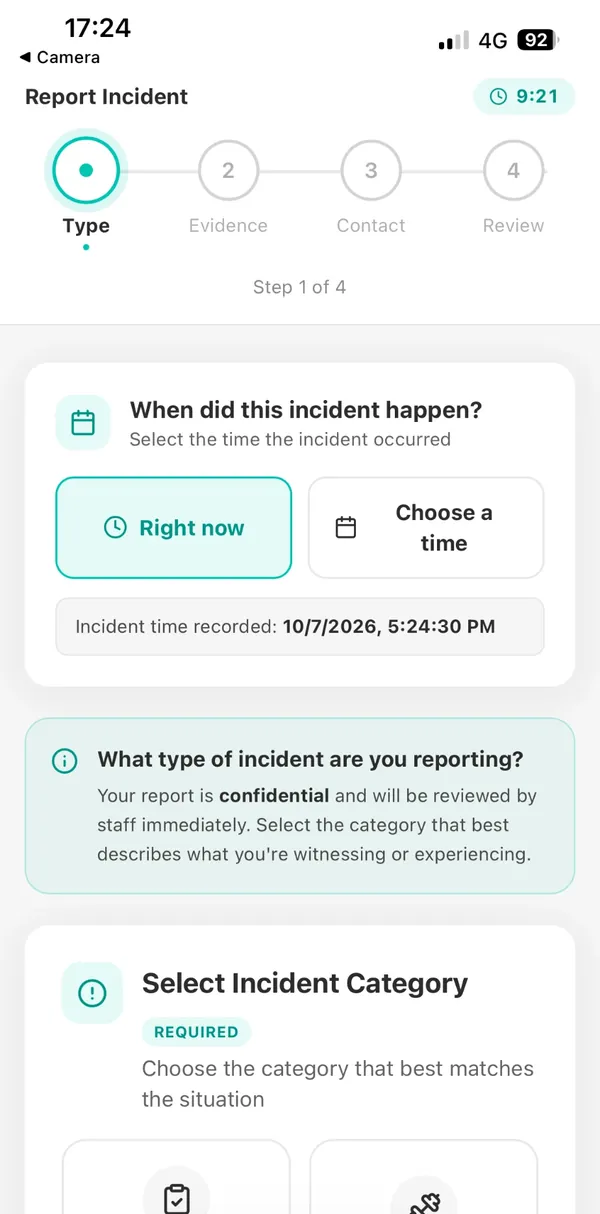
Anyone can report. No app. No login. No friction.
A QR code at every reporting point. Scan it with any phone and the report form opens instantly — no account required. Staff, visitors, contractors, and members of the public can all submit in under 30 seconds.
- Works on any smartphone — iOS or Android
- Photo upload built in to every form
- Location pre-filled from the QR code
- Instant confirmation sent to the reporter
Every capability. Deep-dive ready.
Each module works standalone or together. Click through to see the full detail, screenshots, and how-it-works for each one.
Live in 48 hours.
No hardware. No lock-in.
GuardSync runs in your browser and on any phone. We generate your QR codes, configure your alert routing, and onboard your team — typically in one business day.
Day 1
Onboarding call + site config
Day 2
QR codes live, team activated
Week 1
Full visibility, first reports flowing
Your team gets alerts, checklists and reports on the GuardSync mobile app.


Already using a safety platform? See GuardSync Intelligence